
Sarathi Parivahan Sewa– Parivahan Sewa, Driving License
Sarathi Parivahan Sewa is an official online platform launched by the Government of India to provide digital services for driving licences and learner licences. Through this portal, citizens can apply for a Driving Licence (DL) or Learner Licence (LL), renew an existing licence, schedule driving test appointments, access licence-related documents, and check application status online. As part of the Parivahan Sewa system, Sarathi makes licence services more convenient by reducing paperwork, saving time, and allowing users to complete many procedures from home.
Sarathi Parivahan Sewa focuses on driving licence services, whereas other sections of the Parivahan Portal manage vehicle registration, Registration Certificate (RC) services, permits, and other transport-related tasks. This separation helps users find the services they need more easily. Through the official Parivahan portal, citizens can access various RTO services online, making the process simpler, faster, and more transparent.
Licence Related Services
Apply for a new driving licence, renew an existing one, or get a learner’s licence online. Book appointments, request a duplicate licence, track your application status, take the learner’s test, and manage other licence-related services easily.
Vehicle Related Services
Vehicle registration (new/registered): schedule appointments, track applications, update addresses, transfer ownership, manage hypothecation, and more vehicle-related services.
Key Services Offered by Sarathi Parivahan Sewa
Sarathi Parivahan Sewa offers various online services for Driving Licences (DL) and Learner’s Licences (LL). Citizens can handle most licence-related tasks from home without making repeated visits to the Regional Transport Office (RTO). The official portal simplifies the application process and saves time by providing easy access to essential services. Here are the main services available through Sarathi Parivahan Sewa.
Driving Licence Services
Learner’s Licence (LL)
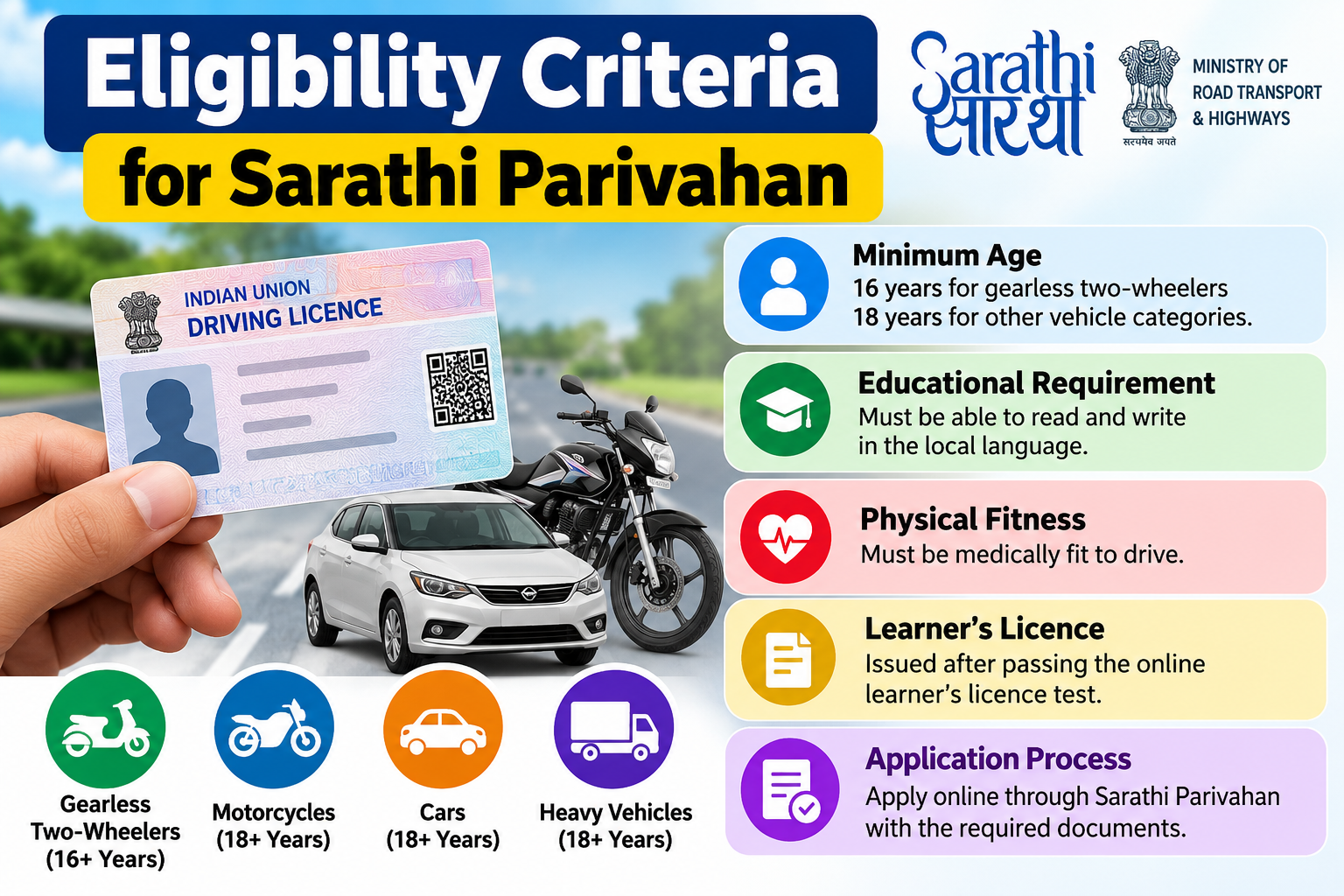
A Learner’s Licence (LL) is the first stage in the process of getting a permanent driving licence. Eligible individuals can apply online, complete the necessary formalities, and appear for the learner’s licence test. Applicants generally must be 16 years old to apply for a licence for certain gearless motorcycles, subject to applicable conditions and parental consent, and 18 years old for other vehicle categories. A learner’s licence is typically valid for six months.
Permanent Driving Licence (DL)
Once applicants have held a valid learner’s licence for the required period and passed the driving test, they can apply for a Permanent Driving Licence. They can complete the process online through the Sarathi portal, including booking a driving test appointment and tracking their application status.
Driving Licence Renewal
If your driving licence is nearing its expiry date, you can apply for driving licence renewal online to simplify the process and reduce paperwork. Renewing your licence before it expires can help prevent delays, avoid potential penalties, and ensure a hassle-free renewal experience.
Duplicate Driving Licence
If your driving licence is lost, stolen, damaged, or illegible, you can apply for a duplicate licence through the Sarathi Parivahan Sewa portal. Depending on your situation and state requirements, you may need to submit supporting documents, such as a police report.
Change of Address in Driving Licence
If you have moved to a new address, you can update your driving licence details online by submitting the necessary documents. Keeping your address information current ensures that your licence records remain accurate and up to date.
Download or Print Driving Licence
After approval, users can download a digital Driving Licence (DL) or Learner’s Licence (LL) for easy access. They can also view and access their digital licence through government-supported platforms such as DigiLocker and mParivahan.
Driving Test Slot Booking
The Sarathi portal lets applicants book, reschedule, or cancel driving test appointments online. This convenient service saves time and allows users to select a suitable date and time for their driving test.
Vehicle-Related Services
While the VAHAN system primarily handles vehicle-related services, users can also access these services through the broader Parivahan Sewa platform.
Vehicle Registration
Apply for a new Registration Certificate (RC), renew your vehicle registration, and manage various vehicle registration services online with ease.
Transfer of Vehicle Ownership
Vehicle buyers and sellers can initiate an online vehicle ownership transfer by submitting the required documents and completing the necessary verification steps.
Duplicate Registration Certificate (RC)
If your Registration Certificate (RC) is lost or damaged, you can request a duplicate certificate online through the official portal.
Fancy Number Booking
Vehicle owners can join the Fancy Number Auction to bid for VIP or preferred registration numbers for eligible vehicles.
No Objection Certificate (NOC)
Request a No Objection Certificate (NOC) to transfer your vehicle registration from one state or Regional Transport Office (RTO) to another.
Road Tax and Fitness Certificate
Owners of commercial and eligible private vehicles can pay road tax, renew fitness certificates, and manage other related vehicle services online.
E-Challan Services
Sarathi Parivahan also offers convenient access to essential traffic challan services online.
Check Challan Status
Users can view outstanding traffic challans by entering their vehicle registration number, challan number, or driving licence number.
Pay Traffic Challans Online
Users can pay traffic fines securely through the official online payment portal without needing to visit a traffic office in person.
Payment Confirmation
Once the payment is complete, users receive a transaction reference number and confirmation receipt for their records.
Permit Services
Commercial vehicle owners can conveniently apply for and manage a range of permit-related services online.
- Apply for new commercial vehicle permits.
- Renew existing permits.
- Track permit application status.
- Download permit-related documents after approval.
Information and Verification Services
Sarathi Parivahan Sewa provide different online verfication services that help user to access information.
Know Your Driving Licence Details
Check and verify your driving licence information by entering your DL number and date of birth.
Know Your Vehicle Details
Access key vehicle information online, including RC status, insurance validity, Pollution Under Control (PUC) certificate details, and vehicle registration records.
Motor Vehicle Rules and Forms
Find and download official Motor Vehicle Rules, Acts, government notifications, and application forms directly from the portal whenever you need them.
Name or Address Correction in Driving Licence
If your name, address, or other personal information changes, you can request an update through Sarathi Parivahan Sewa by submitting the necessary documents. After the authorities verify your request, they will update the corrected details on your driving licence.
Track Driving Licence Application Status
Once you submit your application, you can check your Learner’s Licence or Driving Licence status online using your application number. You can track your application’s progress, view the latest updates, and save time by avoiding unnecessary trips to the Regional Transport Office (RTO).
Driving Licence (DL) Online Application Process
Sarathi Parivahan Sewa allows you to apply for a Driving Licence (DL) or Learner’s Licence (LL) online with fewer visits to the Regional Transport Office (RTO). You can handle most of the application process from home, including completing the application form, submitting the required documents, paying the fees, and scheduling your driving test. Follow these steps:
Step 1: Visit the Official Website
Visit to official Parivahan Sewa portal and choose Online Services > Driving Licence Related Services.
Step 2: Select Your State
Select your state or Union Territory list. This will redirect your Sarathi portal.
Step 3: Choose the Required Service
Once you choose your state, the portal will display a list of available driving licence services.
- Select Apply for Learner’s Licence if you’re applying for a licence for the first time.
- Choose Apply for Driving Licence if you already hold a valid Learner’s Licence.
Step 4: Fill Out the Application Form
Enter all required personal information, including:
- Full Name
- Date of Birth
- Residential Address
- Mobile Number
- Email Address (if applicable)
Step 5: Upload Required Documents
Upload required document like:
- Aadhaar Card
- PAN Card
- Voter ID
- Passport
- Address Proof
- Passport-size Photograph
- Signature (if required)
Step 6: Pay the Application Fee
Pay the fees using available payment method. After payment: save or print payment receipt.
Step 7: Book Your Driving Test Slot
Once you’ve completed the application, book your driving test online by choosing an available date and time at your preferred Regional Transport Office (RTO).
- Applicants for a Learner’s Licence must pass the online learner’s test.
- Applicants for a Permanent Driving Licence must successfully complete the practical driving test.
Step 8: Track Your Application Status
After submitting your application, check your Driving Licence Application Status online using application number.
How to Book a Slot on Sarathi Parivahan Sewa
Through Sarathi Parivahan Sewa book a driving test slot to complete online. Follow these steps:
How Slot Booking Works
- Driving test appointments depend on the available slots at your respective Regional Transport Office (RTO).
- The availability of driving test appointments differs across RTOs.
- Weekdays generally have better availability than weekends.
- During festive seasons or holidays, slots may fill up quickly.
Why Are Slots Sometimes Unavailable?
The “No Slot Available” message may appear for several reasons, including the following:
- High number of applications
- Limited daily test capacity
- Public holidays
- RTO staff availability
- Temporary maintenance or technical issues
Documents Required for Driving Licence
Before starting ready these document:
Address Proof (Any One)
- Aadhaar Card
- Voter ID Card
- Passport
- Electricity Bill
- Ration Card
- Residence Certificate issued by Tehsil
Age Proof (Any One)
- Birth Certificate
- Class 10 Mark Sheet
- PAN Card
- Date of Birth Affidavit issued by a Magistrate
Identity Proof (Any One)
- Aadhaar Card
- PAN Card
- Passport
- Voter ID Card
- Ration Card
Learner’s Licence (LL) vs Permanent Driving Licence (DL)
| Feature | Learner’s Licence (LL) | Permanent Driving Licence (DL) |
|---|---|---|
| Purpose | Granted to first-time applicants to learn and practise driving before obtaining a permanent licence. | Permits drivers to drive independently and legally on public roads. |
| Driving Permission | Driving is allowed only under the supervision of a valid licence holder. | Driving is allowed independently without supervision. |
| Validity | Valid for 6 months. | Valid for multiple years, with renewal available according to government regulations. |
| Eligibility | Issued after passing the online learner’s licence test. | Issued after completing the learner period and passing the driving test. |
| Minimum Age | Applicants must be at least 16 years old for gearless two-wheelers and 18 years old for other vehicle categories. | Same age requirements after obtaining a valid Learner’s Licence. |
| Prerequisite | No previous licence is required. | A valid Learner’s Licence is mandatory. |
| Application Process | Submit your application online through the Sarathi Parivahan portal along with the necessary documents. | Apply after completing the learner period and successfully passing the driving test. |
Eligibility Criteria
| Licence Type | Minimum Age | Eligibility Criteria |
|---|---|---|
| Learner’s Licence (LL) | 16 Years – Gearless motorcycles (up to 50cc) with parental/guardian consent. 18 Years – Motorcycles with gears and private vehicles. 20 Years – Commercial vehicles (as per applicable rules). | • Basic knowledge of traffic rules and road signs. • Must pass the online or written learner’s licence test. • Parental/guardian consent required for applicants below 18 years (where applicable). • Medical certificate required for commercial vehicle applicants or applicants above the prescribed age limit. • Valid identity, age, and address proof documents. |
| Permanent Driving Licence (DL) | 18 Years – Private vehicles. 20 Years – Commercial vehicles (subject to government regulations). | • Must possess a valid Learner’s Licence for at least 30 days. • Application should generally be submitted within 180 days of obtaining the Learner’s Licence. • Must successfully pass the practical driving test conducted by the RTO. • Good knowledge of traffic rules, road safety, and vehicle controls. • Medical certificate required for commercial vehicle applicants or where applicable. |
Checking Sarathi Parivahan Application Status
| Step | Process | Description |
|---|---|---|
| Step 1 | Visit the Official Portal | Visit to official Sarathi Parivahan Sewa website and click Driving Licence Related Services. |
| Step 2 | Choose Your State | Select your State or Union Territory from the list. |
| Step 3 | Open Application Status | Click on the Application Status option in menu. |
| Step 4 | Add Details | Enter your Application Number, Date of Birth, and the Captcha Code. |
| Step 5 | Check Status | Click Submit to check the latest status of your driving licence application, including verification, approval, printing, and dispatch updates. |
Checking Sarathi Parivahan Application Status
Once you submit your Driving Licence (DL) or Learner’s Licence (LL) application, you can check its progress online through Sarathi Parivahan Sewa. The application status feature helps you track updates at each stage of the process from home, eliminating the need to visit your Regional Transport Office (RTO) for routine status checks. Follow these steps:
Step 1: Visit the Official Portal
Got to official Parivahan Sewa website and choose Online Services >Driving Licence Related Services.
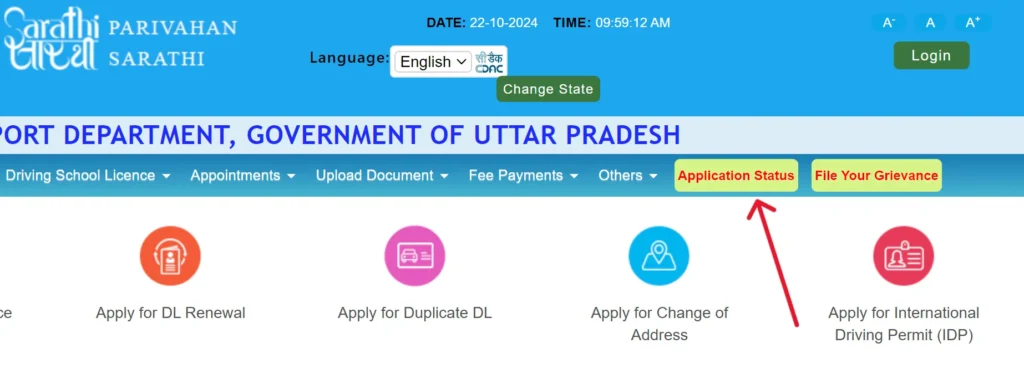
Step 2: Select Your State
Select your state from list open your Sarathi portal.
Step 3: Open Application Status
Click on Application Status in menu.
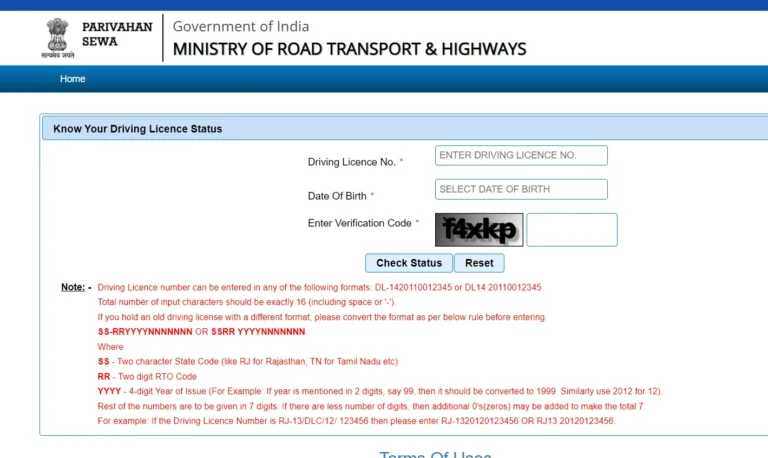
Step 4: Enter Application Details
Provide the following information:
- Application Number
- Date of Birth
- Captcha Code
Step 5: Check Status
Click on Submit or Check Status button to view your application status.
Downloading a Driving License
- Visit to https://sarathi.parivahan.gov.in/sarathiservice/ and click “Driving Licence” menu.
- Click on “Print Driving License”.
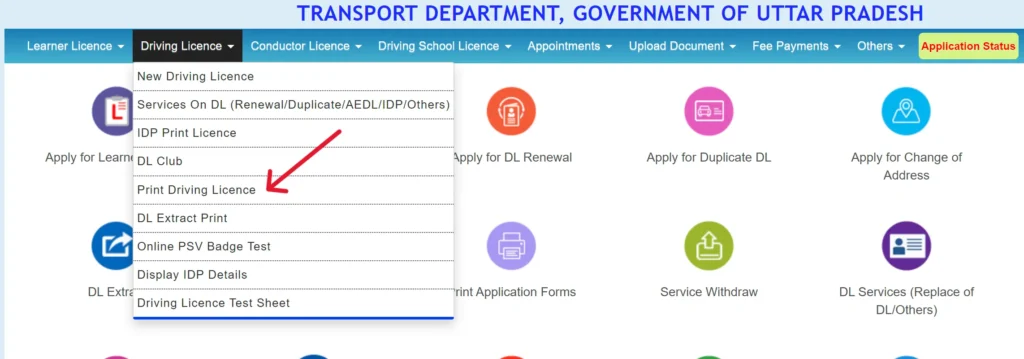
- Add your application number and date of birth.
- Click on “Submit”. To download PDF click on “Print”.

Know Your Vehicle Details
You can check your vehicle information using the “Know Your Vehicle Details” service on the Vahan National Register Portal. Simply enter your vehicle registration number and follow the steps below:
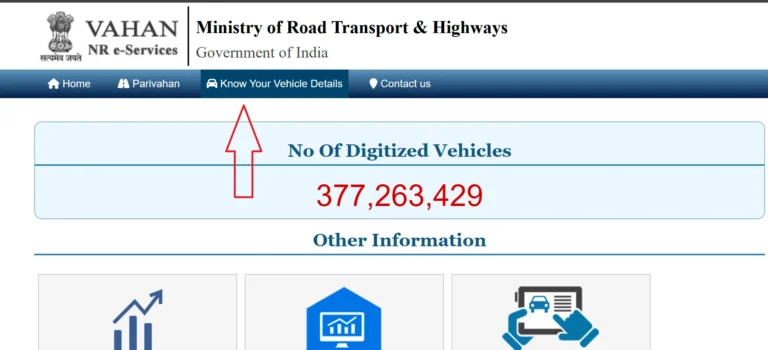
- Visit to Vahan National Register Portal https://vahan.parivahan.gov.in/nrservices/.
- Click on “Know Your Vehicle Details” button.
- Click on “Create account”. Add your number and verify OTP.
- Add OTP code password and submit.
- Login to your account.
- Click on “Login” add your mobile number/password or OTP.
- Click on Submit to access dashboard.
- Access Vehicle Details:
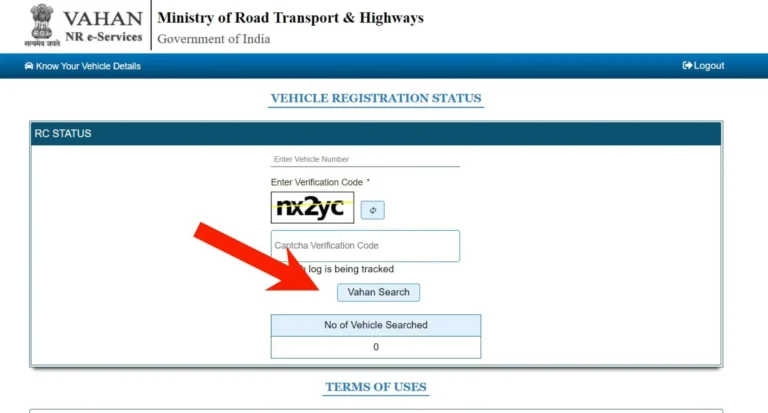
- Click on “Know Your Vehicle Details.”
- Enter vehicle registration number.
- Verify captcha code.
- Click “Vahan Search”.
- View Details:
- Registration: Number, date, RTO.
- Owner: Name (partially masked).
- Vehicle: Make, model, fuel, engine/chassis number.
- Status: Registration validity, fitness expiry.
- Insurance: Policy number, expiry.
- PUC: Pollution certificate status.
- Tax: Payment status.
- Permit: Type, validity (if applicable).
Helpline
| Problem | Email ID | Contact Number | Timings |
|---|---|---|---|
| Vehicle Registration, Fitness, Tax, Permit, Dealer | [email protected] | +91-120-4925505 | 06:00 AM – 12:00 Midnight |
| Learner License, Driving-File | [email protected] | N/A | N/A |
| mParivahan Services | [email protected] | N/A | N/A |
| eChallan Services | [email protected] | N/A | N/A |